Panic Blog
The Future of Status Board
By Cabel
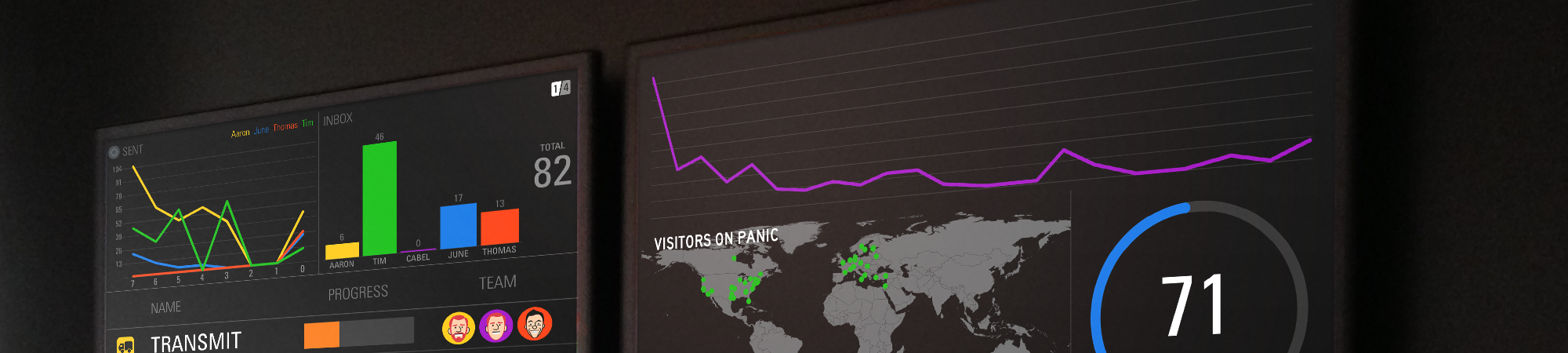
Short story: we’re discontinuing development of Status Board.
Status Board was something we’d always wanted. Originally a very nice web page designed to brighten up our office and act as our virtual water-cooler for company stats — as seen in this famous blog post — it evolved into a feature-packed, beautiful iOS app. We made it very easy to make beautiful boards, it worked great with video-out on a large screen (even despite the AV Adapter surprise), it offered lots of cool customizable modules, and it had a first-launch experience I still think is delightful to this day.
Unfortunately, while Status Board became a beloved friend to offices around the world, sales weren’t enough to sustain further development.
Why?
I think Status Board’s lack of success can be boiled down to a few things.
First, we had hoped to find a sweet spot between consumer and pro users, but the market for Status Board turned out to be almost entirely pro, which limits potential sales on iOS — as we’ve learned the hard way over the past couple of years, there’s not a lot of overlap right now between “pro” and “iOS”. Second, pro users are more likely to want a larger number of integrations with new services and data sources, something that’s hard to provide with limited revenue, which left the app “close but not quite” for many users. Finally, in the pro/corporate universe, we were simply on the wrong end of the overall “want a status board” budget: companies would buy a $3,000 display for our $10 app. Hmm, maybe we should’ve gone into production on LCD displays instead…
What Next?
Soon, we will remove Status Board from sale.
But! The good news for everyone that already has Status Board installed is that it will continue to work fine on your devices in the foreseeable future. There are a few things on the horizon to be aware of: due to API changes our Dropbox support will stop working in June of 2017, and we’ll continue to pay for our weather service as long as we can but sometime in late 2017 it will likely stop working also.
We’ve also just posted a final update, 2.0.13, that adds full iOS 10 support and fixes some bugs. If you use Status Board, make sure to grab that final update before the app is removed from sale in a couple of weeks! Update now!
And any customers who purchased Status Board in the last 30 days or so should contact us — Apple doesn’t provide us with the ability to process refunds directly, but we’ll do everything we can to help.
Thank You
For everyone who helped support Status Board during its tenure, it was a pleasure to work on this app, and we deeply appreciate your support, as always.
 Cabel
Cabel
11/28/2016 3:28 PMOh, to head off one question at the pass: it’s not feasible for us to open source Status Board. It contains code and frameworks shared among our apps that we’re not quite ready to commit to the public domain. Sorry. ?
 JM
JM
11/28/2016 4:01 PMAt least from what I gathered the biggest barrier for “pro” deployments was definitely not being “cheap” at $10 but that buying and leaving something like an iPo Touchd, AV Adapter Cable and USB charger made little sense to corporate customers – all wanted something more integrated.
You should have done a native Apple TV version of this when it became possible. Would make total sense to me.
 Cabel
Cabel
11/28/2016 4:15 PM@JM You sure the barrier after buying a $2k display would be the USB charger etc.? :) But there’s one problem — Apple never provided an official WebKit view for Apple TV apps, and Status Board depends heavily upon them, for custom panels, etc. So unfortunately, it wasn’t possible to port an Apple TV version, even though that would make the most sense…
 Stirling Campbell
11/28/2016 5:14 PMI love your apps am sad to see this one go, though if maintaining is too much I understand. Would be great if it can be open sourced but again if it contains sensitive stuff I get it.
Please never shut down Transmit and Prompt, I use them probably more than any other apps on my devices..
Now to start the painful (I’m anticipating) end story of fire watch I’m sensing it’s going to get sad..
 The Person
11/28/2016 7:52 PMSorry you had to learn these tough lessons the hard way!
If it matters: Coda (and Prompt and Transmit) are the REASON I have an iPad (and the keyboard attachment). And once I showed everyone at the office how I use them for Serious Stuff ™, the reason they all have iPads too.
Please keep up the development work on those, and please charge more to make it worth it.
Shiiiit I’d even want Prompt on macOS (even though it already has one built in). I love that UI!
 Zack Kitzmiller
11/28/2016 7:54 PMIs there no chance of OS ever?
 Jason
Jason
11/28/2016 8:42 PMCabel,
Is it possible that it is priced too low? I would have no issue recommending it at $100, or even more. That was the one thing I did not understand about the app was the price. It seemed to undercut itself from contention. The places I pitched it worried that just this sort of thing would happen, as a higher-end product is generally supported longer. This was so inexpensive that it felt consumer, even though it could be an incredible tool for organizations and even municipalities to communicate information to large audiences. We even had a quote outstanding using it to power a cable channel for an internal hospital network.
Any chance you would consider re-releasing it as a true pro-priced app? I will promote the heck out of it. I would not price it below $100. I will push it at $200 per license.
 Chris applegate
11/28/2016 8:52 PMWhen do I start
 Anon
Anon
11/28/2016 9:21 PMIt be refreshing if you used this as an opportunity to enter the FOSS community. It’s disappointing how lacking Apple-centric shops are with Open Source contributing.
 Peter
Peter
11/28/2016 9:30 PMWhile this definitely sucks, I sure hope that all this time you’ve spent not developing for Status Board means there’s an imminent update for Transmit Mac OS…been waiting quite a while……
 Josh
Josh
11/28/2016 9:35 PMAny chance you could turn on the Expansion Pack as a free in-app buy now?
 James Gill
11/28/2016 10:01 PMStatus Board was the most beautiful and thoughtfully designed iOS app ever made for displaying data on a big screen.
It’s been a pleasure providing the GoSquared analytics widgets for Status Board over the years, and we’ll cry a little once the app is gone from the store.
Round of applause to all the awesome Panic folk who put their blood, sweat and tears into making a truly fantastic app. Bravo, all – I can’t imagine the decision to stop work on Status Board was an easy one.
 Casey Hopkins
11/28/2016 10:12 PMI’d pay a billion dollars for this to be an Apple TV app.
 David K.
11/28/2016 10:18 PMPerhaps its stating the obvious, but have you considered shifting to a subscription model for this since it requires ongoing support and integration with external web services? If companies are willing to plunk down $3k to use this, I can see a market opportunity for an ongoing subscription of even a few bucks a month is better than a one time $10 fee.
Alternatively, what about as a macOS app under a similar model (or a higher price point) with more customization (since Apple TV appears to be off the table).
Just some thoughts to share!
 Cameron Eagans
11/28/2016 10:22 PMYou said that open sourcing the app was not possible, but would you be willing to “open source” the visual design bits? That way, somebody else might be able to take the visual parts and run it on a Raspberry Pi or something.
 Mattias
11/28/2016 10:22 PMAs a software developer we added several SB feed for our users to our products. Due to the cost of SB app these efforts never gained traction among our users and we instead moved to our own statusboard. Not as flexibel or beauty but running in fullscreen mode on iOS so the same thing was achieved.
Sad to see you go but I fully understand your decision. Good luck with future endeavours!
 Robert Spivack
11/28/2016 11:22 PMSorry to see this go. I understand your reluctance to open source, but please consider making this into a framework or licensable toolkit. I have envisioned several enterprise-oriented apps would love to have the underlying display mechanisms uniquely provided by this app.
A reasonable one-time fee or a one-time fee plus run-time/royalty license with annual maintenance contract might be viable to continue supporting.
Keep in mind that many enterprise apps are for in-house use and distributed privately; even commercial apps can be distributed officially with Apple enterprise tools that bypass the regular App store (avoiding all the race to the bottom pricing, etc.)
 Gary
Gary
11/29/2016 12:25 AM“(…) As we’ve learned the hard way over the past couple of years, there’s not a lot of overlap right now between “pro” and “iOS”. An interesting thought. As a publisher of Business/Productivity software for iOS, I have EXACTLY the same feeling, and I am considering abandoning the Apple platform as well. Perhaps you would care to expound, offer thoughts on alternative platforms and post on Hacker News? It would make a great read.
 Manuel
11/29/2016 1:31 AMI’m sure the talented people at Panic can figure out a way to make Status Board an Apple TV app and raise the price of the app to 99$ or maybe 299$ as an in-app purchase for pro-customers. That way it would make more sense for you to sustain development.
Still, I’m disappointed in this news. I bought all in-app purchases of this app and use it heavily.
 Corentin
11/29/2016 1:33 AMWill you open the application source code to the community ? I’d be happy to maintain this application!
 Ed
Ed
11/29/2016 2:33 AMCould you at least make the expansion pack free of charge until the app vanishes?
 Steve Nicholson
11/29/2016 4:13 AMAnother sad indicator that the only ways to make money on iOS are with consumable in-app purchases and sticker packs. Thanks for continuing to fight the good fight with the rest of your iOS apps. It must be frustrating.
 Tom Bridge
11/29/2016 4:22 AMCabel & Co:
Thanks for everything with Status Board. I love this app so much, and I totally understand your choice. As always, Panic makes the best stuff, and I appreciate your efforts on this product over the years.
 Robert M
11/29/2016 4:31 AMI’ll second the suggestion that a product like SB is a good fit for subscription model. Anything with data feeds and integrations is a good candidate, really. I explored using Panic Statusboard in our office, but ultimately went with a Klipfolio based system running on a Chromebox; not as beautiful but it had an obvious future. Ongoing costs are about $175/mo. Statusboard ended up being an early proof of concept for a more expensive, flexible, and uglier board.
Anyway. It’s clear a lot of thought went into your decision, and given your past public questioning of whether independent iOS productivity apps are sustainable, I had a feeling it was coming (another reason we went with Klipfolio). But as a business user, there is a lot of value in what Statusboard provides, and in retrospect, a subscription model with a high cost might have enabled it to become sustainable and justify ongoing development.
It was a good ride while it lasted. Thanks for that! (And please don’t drop Diet Coda or Transmit next!)
 Joe Martin
11/29/2016 4:38 AMI’m sorry to hear this, although I fully understand the motivation.
I have an old iPad hanging on a wall in my dining room, running Status Board as an info board for my daughters. They check it every day to get the weather forecast, review upcoming events, see who’s responsible for which chores, and see what the hot lunch is at school. (The last two are using custom HTML widgets.)
We’ll keep using it as long as we possibly can. Thanks for the great product.
 Oscar Alaniz
11/29/2016 4:51 AMThis is a sad way to start a day. I use it a lot to give every kind of information in our church. It has become vital to us. I hope we could find a replacement good enough soon.
 John
John
11/29/2016 5:16 AMAre there any decent options to replace status board that don’t cost a fortune? We use status board as a welcome screen at our company, and every other option I’ve found has been exceedingly expensive.
 Benjamin Lupton
11/29/2016 5:37 AMWhile not a user myself, I gotta agree with the price comments. It is priced way too low.
There is an entire chapter in Influence: The Psychology of Persuasion by Robert B. Cialdini PhD on how upping the price can add more value. I think it is even covered in the introduction. https://balupton.com/amazon/B002BD2UUC
 Steve
Steve
11/29/2016 5:39 AMOuch,
I bought Unison and was discontinued right after a couple of months. Then I bought StatusBoard and it’s now discontinued as well… Too bad. That hurts.
But as a developper myself, I know too well the inside cost of maintaining a product that doesn’t sell enough to cover those costs.
 Scott
Scott
11/29/2016 6:30 AMI’m bummed out. This is such a cool app. I bought it just to play with the UI (and with the idea that maybe I could use it in the future). Panic has so much talent/taste/class. I’m always excited to see what you guys do next. I do think there could be a market for something similar on Apple TV at a much higher price point.
 Ett Venter
11/29/2016 7:01 AMWell that sucks.
I use status board almost every single day, and I absolutely love it.
Anyone know of any good alternatives?
 Thorgal
11/29/2016 7:39 AM@Manuel: Oh, shut up already. It’s shame on YOU, not the developers who are going broke. It costs over $100K per year to hire one, just one quality iOS developer, while Apple mobile app ecosystem remains an abysmal screw-up with freeloaders unwilling to pay anything over $0.99 for quality software, with an unsolvable millions-of-junk-apps discoverability problem, and with Apple App Store Search Ads advertising at $3 – $5 per each new acquired user. “Planet of the Apps”? It more like “Planet of Apple Concerned Only About Selling Overpriced Hardware to Freeloaders”.
 Dan
Dan
11/29/2016 9:14 AMMy (former) employer used Status Board. And we felt the same way—price was low, in-app purchases were cheap, pay only once. We’d have easily paid $20-$30/year for the basic app and $20-$30/year more for each integration and dual-display support.
Honest question: why didn’t you try raising your prices before quitting?
 Josh
Josh
11/29/2016 9:48 AMSad to see Status Board go. My company Grow.com makes a web app that can replace the functionality for businesses. Ours costs $500 a month, and we don’t have an iPad app yet, so different markets I think.
 Eric
Eric
11/29/2016 9:53 AMI’m also mystified why you aren’t willing to try the subscription model?
And I was really waiting for an Apple TV version of the app. Maybe one last relaunch? I think you guys could make it work. Up the price!
 Jack
Jack
11/29/2016 10:09 AMTo anyone looking for a cheap replacement, google “raspberry pi status board”
The UI for creating the status board won’t be as nice as Panic’s app, but the end results look pretty good based on the images showing up in search results.
And an added bonus is that a raspberry pi 3 is around $40, includes a full size HDMI port, and Wifi, and can be powered from a typical USB power source, either from a cheap adaptor, or many TV’s now provide USB power.
 Jonathan E Isom
11/29/2016 10:36 AMI have a suggestion. Could you turn Apple TV and tv out into an in-app subscription as a trial.
Alternatively there are many talented developers out there that would possibly volunteer to support it for free. I hadn’t heard of it myself until the discontinue announcement. I see potential just as a customizable twitter client. Text and grid are to big on a Pro 12.9 screen though for my tastes on this.
 Dave
Dave
11/29/2016 11:10 AM“there’s not a lot of overlap right now between “pro” and “iOS”.”
Would love to hear more on this, possibly in it’s own blog post?
 Brendan
11/29/2016 11:40 AMI’d just like to offer my thanks to you guys for this app. I’m one of the nonpros who bought it, and it’s rekindled my interest in HTML/CSS. I downloaded it to keep track of who on my team is in the office/working from home/on vacation/etc., as well as my calendar, some time zones, etc. The DIY-nature of setting up a table and beating on my crusty HTML (seriously, I took one HTML course in high school, 2000ish, and monkeyed around with some CSS as a hobby) to get a result is something I’d forgotten I liked. So, cheers to Status Board. I only found it a couple weeks ago (I won’t be needing a refund, either, since I plan to use it as long as it keeps working!), but’s it’s a great little thing you’ve built!
 Brendan
11/29/2016 12:04 PMAll good things come to an end. But this is indeed way too soon.
Status Board is one of my favorite apps for iPad, it accomplishes something not done anywhere else, and done in a brand new way, extremely easily.
If this app was to continue:
I second the request for an Apple TV version of this app, and would recommend more easy third party data integrations.
 Markus
11/29/2016 12:25 PM:-(
 Markus
11/29/2016 12:26 PM:(
 Bruce
Bruce
11/29/2016 2:02 PMVery sad about this. I’ve even worked with your team on a couple of IMAP issues directly.
One issue(in my not very valid opinion) seems like it didn’t update or add anything after the initial release. A subscription model would have been fine, as long as new things popped up every 6-12 months or so.
Thanks for the other apps – I hope I can find a decent replacement for Status Board soon.
 Adam Yanalunas
11/29/2016 2:03 PM:/ sad to see a great app like this go.
 Jerry Sarfati
11/29/2016 3:06 PMweather isn’t working any more :( (Bad response from weather server)
 Rob
Rob
11/29/2016 4:15 PMI can tell you what stopped me, the iPad requirement. IMO Apple isn’t doing anyone any favors pushing computers, and phones, and tablets, and watches all as part of a single lifestyle/ecosystem play. Developers spread their thin resources across these platforms based on perceived fit or audience, and that is not necessarily the way consumers (or businesses) make purchasing decisions. I’d guess people who would have championed Status Board weren’t in a position to do that. Like I said, that was my situation. If I could have somehow worked with Status Board without buying an iPad, I would have done that.
Interesting, the comment that there is little overlap between iOS and “pro”. It’s a great shame what we’re doing to software, and the way we’re essentially setting people on one or another track, the most popular of which artificially limits what they go on to do with technology, and how they see their relationship with technology.
Anyway, I hate to see great software go away for the wrong reasons. Thanks for all of the time and efforts. I hope to continue to be a Panic customer for a good long time.
 Peter Dowker
11/29/2016 5:07 PMThanks folks – enjoyed the app and have hopes to see you resurrect it someday.
 Bernard Forgues
11/29/2016 8:42 PMSorry to hear that.
Status Board is so gorgeous, and such a great idea, it almost lured me into buying an iPad back when it was launched. But of course I didn’t. I would have bought a Mac-OS version instantly and never could understand why there isn’t one.
Keep on the great work, I love your apps.
 József Schaffer
11/29/2016 10:16 PMI impulse bought Status Board and set up key company metrics on an iPad Pro. Then I realized there is just _no_ way for us to have the iPad serve as a dedicated machine. If we were to do a status board we’d probably end up getting a Raspberry Pi and run it from there. (Even if we had any other iPad lying around we wouldn’t have used it for Status Board.) The writing was on the wall.
 John Kacz
11/30/2016 7:34 AMFor those looking for an alternative, we’ve experimented with Dasher on tvOS and it seems to work well.
 Andrew Newby
11/30/2016 8:00 AMOkay, take Status Board away, but can you give us production of those sweet spinner t-shirts and other Panic goods as a tradeoff?
 Markus Ford
11/30/2016 9:59 AMI am just finding out about this! So very disappointed, since we’ve been testing SB to see if it would help us give a heads-up on vital stats across the school buildings of our district. This is such an amazing tool! I know your current feeling is to not do open source with this product. As an educator I’d like to suggest a slightly different approach. License it to a university computer science club. Let them keep the product going; they can use the proceeds to fund the club. They gain real-world experience, Panic gets the inside track on hot up-and-coming developers, and we SB fans get to see our favorite tool live on!
Thanks,
— Markus
 Maroney Patrick
12/2/2016 6:49 AMI share the sentiments here in terms of the usefullness of this App and willingness to cough up some dough to see if we can extend it’s existance. So put me down for $50-100/year. Don’t know your numbers or what % of your base needs to commit to make this a viable business decision. But at least know that many of us have found this to be a very useful, innovative, and unique extension to our iPad use cases. There is a market between minimally useful free/cheap apps and full blown Enterpri$$$e Frameworks. I’d be willing to bet that better exposure to a very large community of “hacker” Data Scientists could grow your base. Should you decide to take another shot at the business model, I’ll sign up to share some reference implementations/use cases with the Data Sciences communities up on LinkedIn.
 Paurian
12/3/2016 9:24 AMAs a developer, this app has always held interest. Just days before the announcement, I got my development group to sign on to using it. We installed an HDTV and was just getting started with ideas of metrics to chart when the announcement came out.
Status Board fills a hole in the market with its beautiful presentation. It’s something we can impress customers with when they tour our office. It’s a shame to see it go. Hopefully you’ll resurrect it in the future.
 Ganger
12/5/2016 1:41 AMI am really sad to see this go. Our small business has been working behind the scenes with our software vendors to provide status board consumable data for over 6 months, and we are nearly there. This app is one of the best designed, versatile and feature-rich options for what it accomplishes. I agree with some of the other commenters that the hardware side was a hurdle unless they were pro. Its too bad appletv isn’t an option. I’d also be willing to pay much more to keep this around. Sorry that this one didn’t work out guys – perhaps it can remain in skunkworks…
 Ryan
Ryan
12/6/2016 2:08 AMThis is a shame. Does anyone know of a mac/web app which can provide similar functionality? I’ve got a spare monitor which I would like to use as dashboard.
 Levi
Levi
12/6/2016 10:19 AMKickstart?
 Petr
Petr
12/7/2016 6:36 AMI use Statusboard everyday :(
@Rayn: Maybe? https://itunes.apple.com/cz/app/numerics-dashboards-to-visualize/id875319874?l=cs&mt=8
 Tyson
Tyson
12/8/2016 7:59 PMCould you stickey a list of possible replacements your loyal customers could try?
 Maikel
12/9/2016 11:37 AMHate to see this one go, but don’t think the price was the problem. A subscription probably would make it more viable for panic but hinders impulse buys.
Our problem was the iPad requirement that made it to costly (the tv was cheaper). Apple TV is has WebKit maybe panic can make deal with Apple so they may approve how WebKit is used in this app.
Would love to use panic SB on ATV, instead of building our own dashboards, while maintaining features like AirPlay and stuff :)
Good luck and thnx
 Ryan
Ryan
12/12/2016 8:55 AMBummer. I literally just got this hooked up to huge screens we installed in our new offices when I saw the news. I kind of sold my boss on how great this would be and how we needed extra monitors to support this. Hope it works long enough for me to find a replacement.
 Jörg
Jörg
12/13/2016 5:48 AMThis is realy sad to hear. I’ve recommended StatusBoard to many people, because I love the idea behind it so much. It would be great, if the project could continue somehow (esp. Dropbox – Support) – Bye from Austria!
 Glen
Glen
12/13/2016 8:03 AMRaise the price, make the offer and the customers will come. I will re purchase on multiple devices at a higher price any day. Great product and it is so simple compared to others.
 Rodonode
12/14/2016 12:39 AMCabel & Co:
Thanks for creating Status Board. Man…so sad to hear the news. I understand your decisions. Hate them. But understand them. It is what it is and I will continue to use this amazing app for as long as fate will allow. Grateful to all you geniusezsz there at Panic.
 Wolfgang
12/17/2016 2:34 PMWhile I understand that you need to make tough decisions, I want to second the idea of a subscription model. I would happily pay US$10 per year, maybe double that, if that ensured continued development…
 Andreas
12/19/2016 4:25 AMI would also happily pay a subscription if that was an option.
 Depressed Status Board user
12/21/2016 1:21 AMSince there are so many people with the same needs here, I dare to ask: What options do we have?
– Numerics
– Dasher
– Rasberry Pi running [something]
Anything else?
I had a quick look at these, my take:
***Numerics***:
Pros:
– Clear company behind product.
– Supports all iOS devices, not just iPad.
– Comes with sources such as google docs, Facebook, youtube etc.
– Template support
– Apple watch support.
– Widget in iOS support
Cons:
– Only Apple TV via airplay. No tvOS app.
– No support for vertical monitor like StatusBoard.
– No photo support
– No countdown widget.
***Dasher***:
Pros:
– Apple TV.
Con:
– You need to be a developer to get started.
– No quick start guide or examples to get you doing. Only spotty documentation.
– No support for vertical monitors
– No Support/contact on website, many broken links in documentation.
– References to dasherapp.com, but uses dasher.tv – confusing.
– No countdown widget or any other default widgets.
 Max
Max
12/29/2016 2:25 AMHi ! I love status board and if you stop it development, i want to purpose an open-source alternative with web technologies can you contact me by email ?
 Arthur King
12/29/2016 10:23 AMSorry to hear this is going away. Really helpful. Reading the comments about upping the price or changing to a monthly or annualized subscription. Hope you do well with your other apps or find a way for this to come back.
 Depressed Statusboard user
1/1/2017 2:13 PMAnd the winner is…:
MagicMirror2!
I’ve played with it a couple of days now. It has way more features and sources than Statuaboard, but I havnet seen any nice graphs yet. Im sold, already ported half of my code there now. Check it out! Free, open source and can even run on a $10 Raspberry pi with zero setup!
https://github.com/MichMich/MagicMirror
 Brett
Brett
1/2/2017 4:33 PMI would have paid $100 for a license. Too bad, so sad.
 emilio Almeida
1/3/2017 11:00 AMDear all,
I really feel bad because of this news you have great product and I believe can be developed. But really sorry to hear.
Personally I feel disappointed because when I bought it, there was no due date for the service. If I knew this I would not have bought it. There is an upright issue from my perspective. Personally I believe this is not right and as a customer I am not satisfied with this action. I would like to ask for a refund.
best regards
 Larry
Larry
1/11/2017 9:18 PMThis is a real shame. I think you guys should seriously consider revisiting this product and adjust pricing accordingly. I actually just stumbled upon it only to discover it was discontinued. Letting this fizzle seems rather senseless as there really isn’t much out there like it and if the market was primarily pro users, as you have stated, the pricing structure was way off. As an IT consultant and hobbyist, I would have happily paid $50+ for this software along with recommending it to quite a few clients of mine. All the best.
 Peter
Peter
1/19/2017 3:33 PMHow about a RasPi (Linux) Version?
I’ve got a 55′ 4k monitor on the wall and while I’m working (and not watching movies) it might as well serve a useful purpose and show me some stats, stocks, candlesticks (like this: https://www.ig.com/uk/ig-forex/gbp-eur?marketfinder=GBPEUR) etc. That would be VERY useful indeed. The whole thing running from a RasPi 3 and remotely controlled from my Mac.
Well, one can only dream!
But I have to agree: iOS is a dead end when it comes to professional uses. Just barely managed to run my Bitscope on an iPad. The hoops you have to go through is unbelievable.
 Daniel
1/25/2017 7:59 AMWe’re still using it and still actively developing boards to go up on it. I don’t see why you won’t just charge what you need to in order to keep it working. Give us a subscription, I’ll sign up.
 Holger
2/5/2017 12:49 PMThink about any kind of making parts of the status board open source for all those small data collecting smart home meters.
 Paul
Paul
2/13/2017 11:01 AMIs there a way to backup the .ipa file so that I can restore it when I wipe my iPad? I don’t see it in my mobile apps directory (on macos) or a way to export it via iTunes.
 Paul
Paul
2/13/2017 11:11 AMOf course it would help if I read your post at https://library.panic.com/statusboard/future/ first! For anyone else that has the same question, the answer is at https://support.apple.com/en-us/HT201272#apps
 Chris
Chris
2/16/2017 10:54 AMThis is a real damn shame. We bootstrap a lot in my company and need the opportunity for rapid prototyping. This is no longer possible and there is now a hole in the market. The product was rolled out with such great buzz and then you guys dropped the ball – so many great integrations are available and the opportunity to support this product through subscriptions is clearly very high. B2B AND B2C are certainly possible, so many SMBs use this product as well as so many “intrapreneurial” groups in large organizations use this. This is a tremendous loss and a tremendous loss in a category that you OWNED.
 WAN Movies
2/25/2017 4:18 PMHello Everyone, Check Our Website For New and Lastes Movies named “Panic Blog » The Future of Status Board” ,Our Website for Watching The Lastes Movies And download Online for Free You Can take a Look to Our Website WAN Movies Let Us Grow and Thank you for you support
 Mick
Mick
3/2/2017 4:13 PMDoes anyone else think this site looks very similar to statusboard. http://getcastor.com/
 Pedro
Pedro
3/21/2017 3:00 AM… it is similar indeed, if it is not a copy of the design, maybe it is a license of the app. Look at the makers of getcastor, they are also app developers. Nevertheless, I think that would’ve been a good move for statusboard. I have since in the past two years many ipad app developers closing down popular apps only to sell them as SaaS in the cloud. That is the way to go in the end, in terms of securing revenues.
 Pedro
Pedro
3/21/2017 3:05 AMsorry … not “I have since in the past two years” but “I have seen in that past two years”.
 basket tn homme
3/30/2017 8:47 AMhe decisions that went against his teamEPA9Marcus Rashford and Laurent Koscielny collide with the linesmanArsenal rely on him but we cannot expect players of his pedigree to perform at their best if they do not get recovery time.
 Andrew Schneider
6/2/2017 10:16 AMCan I get an ETA on when the app will officially go down? I was thinking of making a big board with just the “countdown” panel featuring the end date lol…
Seriously though, it’s sad to see it go–maybe someday it could be resurrected with a more sustainable price model? Either way, thanks for everything you guys do over there at Panic. I love using your apps and look forward to seeing what’s in store for the future….
 kevin gornishteyn
6/12/2017 12:15 AMGreat post
How can I am get ETA on when the app not working and it’s down ??
 Lilabby
6/12/2017 12:16 AMHelp me how can I am get ETA ??
https://www.mobilerepairs4u.co.uk/iphone-screen-repair-london-uk/
 Boba Murray
7/24/2017 2:34 AMThank you for the information!
 Boba Murray
7/24/2017 2:35 AMAlso, this can help with user experience
 Roy Hodges
9/1/2017 12:24 PMYes, you can open source it — a lesson in product design. Contracts, contracts, contracts or interfaces, interfaces, interfaces — develop such that you have a “firewall” between products and common libraries.
Is it possible to release the Status Board code into production and remove the code that is proprietary along with GPL code (if any)? I wonder how much implementation would need to be done to execute the functionality that the Status Board code requires. Why not let the Open Source Community fill in the holes?
This was a great product and I remembered it, went to roll it out today and saw this — Panic is great, but I feel this is a mistake, it just needed a better business model, marketing and public relations.
 Jerry
Jerry
9/21/2017 10:36 AMJust upgraded to IOS 11, and Status Board crashes immediately after launch. Anyone have success running on IOS 11?
 Ralph
Ralph
10/5/2017 1:09 PMSame problem here Jerry. iOS 11 broke my Status Board. It crashes immediately when launched.
 J. Bill Chilton
10/14/2017 11:31 AMYes, iOS 11 seems to be the final nail in the coffin. I know Panic have their reasons, and a business to run, but I can’t help it, I’ll forever feel a sense of bitter regret and betrayal whenever I see the name Panic, Inc.
 Manuel
10/18/2017 4:52 AMSame here, iOS 11 is incompatible with Status Boards and it crashes back to spring board on launch.
So sad that Panic gave up such a great app! Let‘s hope they reconsider and make it work with a better business model, like maybe a low subscription that iOS now supports.
 Manuel
10/18/2017 4:56 AMI mean if the problem was that Panic couldn‘t find a sweet spot for a purchase price between pro and consumer, with the subscription models they have no excuse now, right? They have unlimited pricing options now.
Please don‘t take away an app and functionality we bought just because of old and now revamped pricing systems! Go with the times.